A new home for your baby’s history
Leaving Nara?
Meet Dobbin.
Dobbin is a shared baby tracker for iPhone, Apple Watch and Android. Bring your Nara history with you, invite your partner, and log the next feed from your phone or your wrist.

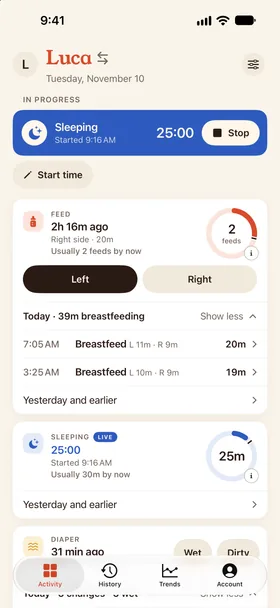
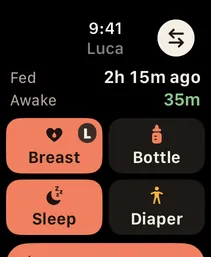
See the last feed in Dobbin.
Meet your new daily routine
Check the last feed and time awake without opening the app.
One timeline, everyone in it
Invite your partner and the people who help. Feeds, naps and changes live in one shared household, whoever logs them.
Your wrist can take a turn
Start and stop a feed or nap from your Apple Watch. Keep the baby in your arms and your phone in the other room.
A quieter kind of app
No ads, no ad tracking, no data sale and no recurring subscription. The price is $29.99 once for your household.
All the everyday things you can log in Dobbin
- Feeds
- Sleep
- Pumping
- Diapers
- Routines
- Milestones
- Growth
- Health
Nara and Huckleberry imports keep the original exported details. Anything that needs attention appears in your preview before you confirm.
Inside Dobbin
See Dobbin before you decide.
Real screens from the iPhone app, filled in with a demo day for twins Luca and Maia.
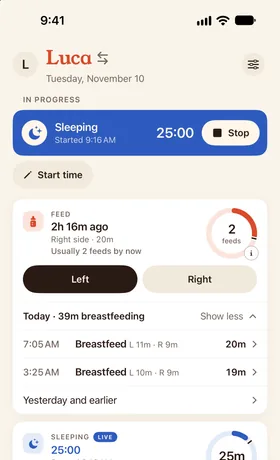
Today at a glance
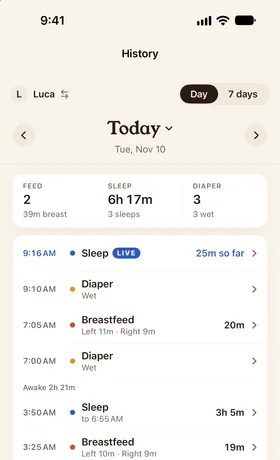
One shared timeline
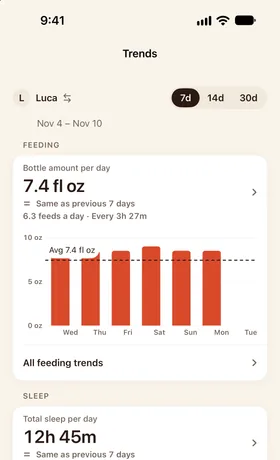
Trends for checkups
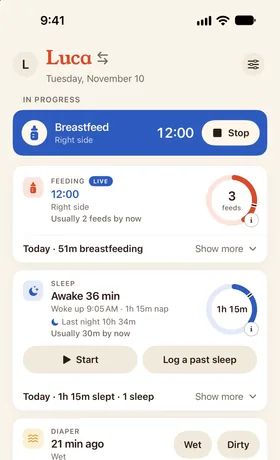
Today's naps next to a usual day
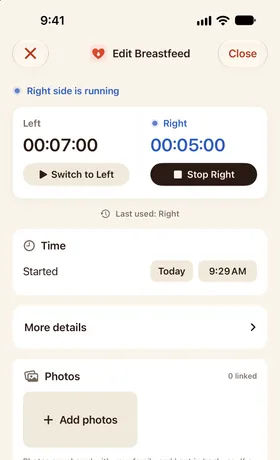
A feed in progress
Keep the story so far
Save your Nara history.
You can save your existing history without a Nara subscription, even after your family becomes read-only. Export a CSV for each child and keep a copy somewhere safe.
Open Activity
In Nara, go to the main Activity tab for the child whose history you want to save.
Tap their avatar
Tap the avatar icon next to your child's name to open their profile options.
Choose Export Data
Nara creates a CSV file containing the child's exported activity history.
Save the original CSV
On iPhone, choose Save to Files in the share sheet. Repeat for each child and keep the original files.
Export instructions and read-only access checked against Nara's official FAQ on October 8, 2026.
What happens to the CSV?
Drop your Nara CSVs on the website for a private preview of each child's history, then tap Finish in Dobbin to bring it into the app. You can also upload them in the Dobbin app on your iPhone.
Drop the CSVs on your phone or computer for a private preview. Nothing is added to your household until you finish in the Dobbin app.
Your history
What comes over from Nara, and what doesn't.
Dobbin's Nara import is built for Nara's per-child CSV. Here's exactly what it brings across, and when Nara is still the better fit.
What comes over
- Breastfeeds, bottles (breast milk, formula or mixed), combo feeds and sleep
- Diaper changes (wet, dirty, both or dry), with stool color and consistency
- Solids, with the foods your baby ate
- Pumping and growth measurements
- Milestones and Baby Firsts, as milestones
- Routines and vaccines
- Medical entries, as health notes, with the medicine and temperature details kept
- Each child's name and birth date, and every entry's original exported details
What doesn't
- Blowouts, meal names and food amounts as fields of their own: Dobbin has nowhere to put them, so they stay in each entry's original exported details.
- Photos, and pregnancy or postpartum tracking. Dobbin doesn't track pregnancy.
- Any entry type Dobbin doesn't recognise. The preview lists it, and you leave it out before you finish.
- A single export of more than about 10,000 rows. If Nara lets you export a shorter date range, use that.
- Your caregivers and your old app's subscription. Invite everyone to your Dobbin household again.
Stay with Nara if…
- You also want pregnancy and postpartum tracking in the same app.
- Someone in your household wants it on a Mac.
- You've already bought lifetime access and you're happy with it.
FAQ
Before you switch
Can I bring my Nara history into Dobbin?
Yes. Export a CSV for each child from Nara, then drop the files at dobbin.app/import/nara for a private preview and tap Finish in Dobbin, or upload them in the app (Account → Import history). Nothing is added until you finish in the app, and unfinished uploads expire after 24 hours. Keep your original CSVs.
How do I export my data from Nara?
Open Nara's Activity tab, tap the avatar next to your child's name, then choose Export Data. Save the CSV to Files on your iPhone and repeat for each child. Keep the original CSVs as your backup.
Do I need a Nara subscription to export?
No. Nara's official FAQ says you can still view and export your existing history when your family becomes read-only after a trial or subscription ends. A paid plan is needed to add new entries, not to export existing data.
Is Nara free?
No. As of October 2026, Nara costs $9.99 a month or $99.99 for lifetime access for the family, after a 7‑day trial that starts with your first log. Without a plan you can view and export existing data, but you can't log new activities. Caregiver sharing and the Apple Watch app are part of the paid plan.
Is Dobbin on the App Store?
Yes. Dobbin is live on the App Store for iPhone and Apple Watch. Use the App Store badge on this page to download it.
How much does Dobbin cost?
The App Store price is a 14-day free trial, then $29.99 once for the whole household. That includes your children, caregivers and the Apple Watch app, on iPhone and Android, with no recurring subscription.
Can my partner and I use Dobbin together?
Yes. Invite your partner and other caregivers to the same household. Everyone shares one timeline, so a feed, nap or diaper logged by one person is visible to the others. Each caregiver uses their own account.
Can Dobbin track routines as well as feeds and sleep?
Yes. Dobbin tracks feeds, sleep, pumping, diapers, routines, milestones, growth and health observations. Routines can include baths, tummy time, bedtime and your own rituals. Nara CSV imports preserve the original exported fields, with anything needing attention shown before you confirm.
Does Dobbin work on Android?
Yes. Dobbin for Android is on Google Play and needs Android 12 or later. You can bring your Nara history in on Android too, and an iPhone and an Android phone can share one household.
Get to know Dobbin
Try Dobbin for the next chapter.
Set up your household, invite your partner and try logging the next feed from your phone or your wrist.