Baby tracker for iPhone, Apple Watch & Android
See when the baby last ate without opening the app.
A nap or breastfeed anyone starts shows up on every caregiver's lock screen.

- 14‑day free trial
- $29.99 once for the household
Lock Screen widgets need iOS 26 or later.
Without opening the app
When did the baby last eat?
Whoever logged it, every caregiver sees the same answers.
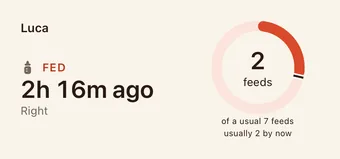
When the baby last ate
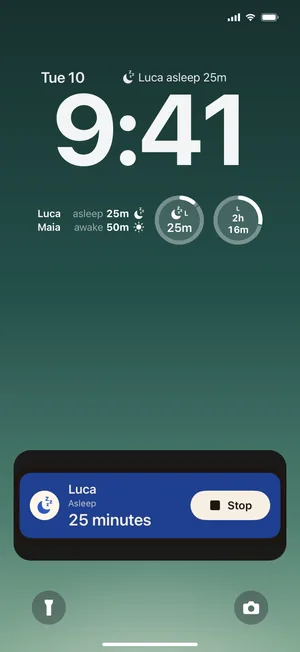
A widget shows when the baby last ate, whoever logged it. On iOS 26 or later it can sit on your Lock Screen and updates within seconds; on Android it sits on your home screen.
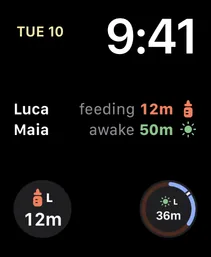
How long the baby has been awake
After a nap, your widgets and Apple Watch complications count the time awake. A nap ring shows today's naps next to a usual day.
Is the baby asleep?
The nap your partner just started
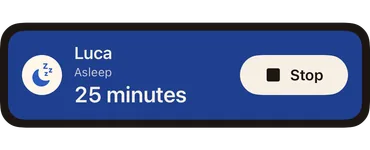
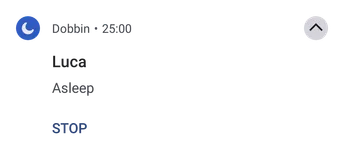
It shows on your lock screen while it runs: a Live Activity on iPhone, an ongoing notification on Android. Choose Alert, Quietly or Off for naps and breastfeeds separately.
Why Dobbin
Whoever has the baby knows how the day has gone.
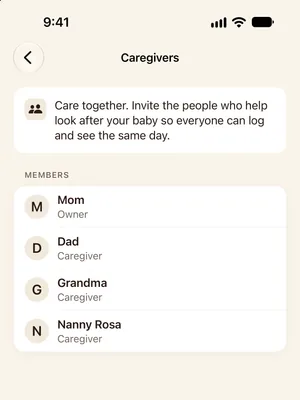
Everyone keeps the same log
Both parents, a grandparent, the nanny: everyone joins one household and sees the same day, all on one purchase. Whoever is on shift knows when the baby last ate without texting to ask.
14‑day free trial
$29.99 once for the household
Every caregiver and every child is included, along with widgets, Live Activities and the Apple Watch app. Start with a 14‑day free trial.
Your 14 days start once you've logged 5 entries in a day, or 15 in total.
Inside the app
Here's what a day looks like in Dobbin.
Real screens from the iPhone app and Apple Watch, filled in with a demo day for twins Luca and Maia.
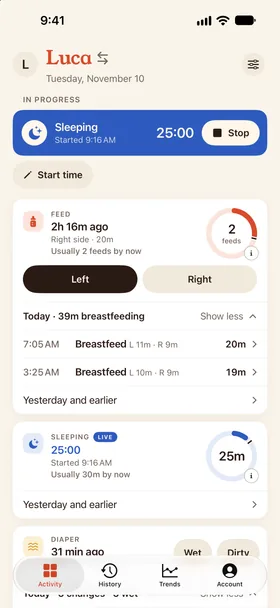
Today at a glance
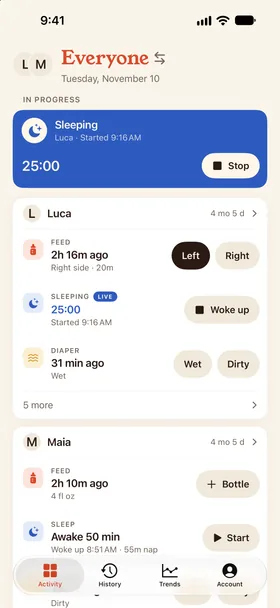
Both kids on one screen
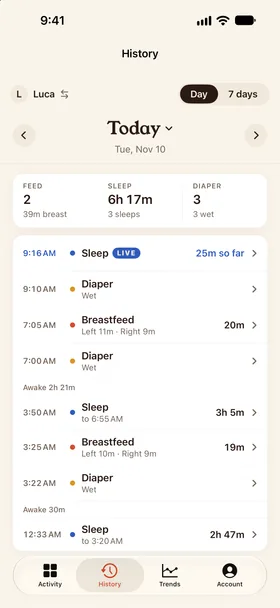
One shared timeline
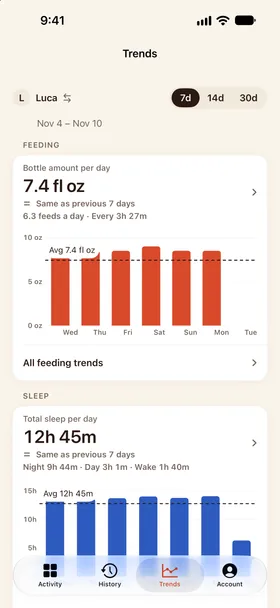
Trends for checkups
What you can log
Eight kinds of entry. Show the ones you use.
Newborn feeds, sleep and diapers from the first day, plus pumping, routines, milestones, growth and health notes. Show only the cards you use. Every entry can be edited or deleted later, and exported whenever you like.
- Learn more →
Feeds
Breast, bottle or solids, with side and amount.
- Learn more →
Sleep
Naps and nights, asleep-for and awake-for at a glance.
- Learn more →
Pumping
Sessions and output, ready for the freezer log.
Diapers
Wet, dirty or both, in two taps.
Routines
Baths, tummy time, bedtime and your own rituals.
Milestones
First smile, first roll, first everything.
Growth
Weight, length and head circumference over time.
Health
Temperature, medicine and symptoms you want to remember.
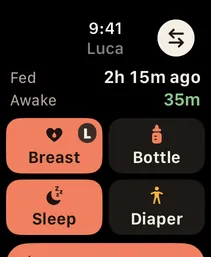
Last feed and time awake
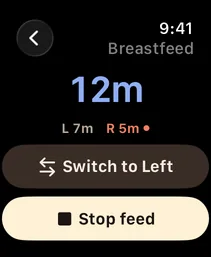
A feed from your wrist
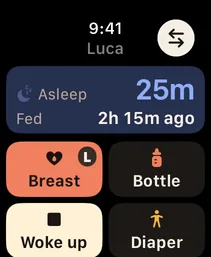
A nap in progress
Apple Watch
Log from your wrist while your phone charges in another room.
After a one-time setup, the Watch keeps its own secure session and talks to your household directly over Wi-Fi or cellular. Big start and stop buttons, a running timer, and complications for time since the last feed and time awake.
The same feed and sleep actions, wherever your hand already is:
- Siri
- Shortcuts
- Smart Stack
- Control Center
- Action button
Ask Siri, “When did the baby last eat in Dobbin?” to hear the time, what it was and which side is next. Bottle amounts use your household's unit, and Siri asks which child when you have more than one.
Tapped the wrong thing? Undo it on your wrist.
Switching?
Coming from Nara, Huckleberry or Baby Tracker?
Keep one shared timeline and check the last feed or time awake from your widgets. Dobbin includes the Apple Watch app in one household purchase. Here's what each app costs.
- From NaraToday: Now $9.99 a month or $99.99 lifetime to keep logging.Dobbin is one purchase for your whole family, with nothing to subscribe to.Dobbin vs Nara
- From HuckleberryToday: Free to log, with nap predictions and AI in paid tiers.Dobbin has one price with every feature in it: no tiers, no upsells.Dobbin vs Huckleberry
- From Baby TrackerToday: Free with ads, and $4.99 to remove them.Dobbin has no ads to remove.Dobbin vs Baby Tracker
Prices from each app's App Store listing and website, checked October 6, 2026. Compare all baby tracker apps
Also coming from Sprout, Glow Baby, Baby Daybook, Baby Connect or ParentLove?
Leaving Nara? Bring your history with you.
Export a CSV for each child from Nara or Huckleberry, then drop it on the website for a private preview of your baby's story so far, and finish in the Dobbin app with one tap. Nothing is added until you do.
Privacy
Only the people you invite can see your baby's log.
Dobbin is paid for once, by you, so it has no reason to sell your data or show you ads. Owners decide who joins the household and can delete it at any time.
Records are stored on secure servers for your household and sent over HTTPS. Read the full privacy policy.
No ads, ever
There is no ad SDK in the app.
No ad tracking
Your data is not used for advertising.
Sign in with Apple or Google
Your account is your Apple ID or Google Account. We never see a password.
Household only
Records are readable only by the caregivers you invite.
Export anything
CSV, PDF or a full backup, whenever you want it.
Delete everything
Owners can delete the household and its photos outright.
FAQ
Questions parents ask
Where can I get Dobbin?
Dobbin is on the App Store for iPhone, with an Apple Watch app included, and on Google Play for Android phones.
Can I bring my Nara or Huckleberry history into Dobbin?
Yes. Export a CSV of each child's history from Nara or Huckleberry. Drop the files at dobbin.app/import for a private preview, then tap Finish in Dobbin, or upload them in the app (Account → Import history). Nothing is added until you finish in the app. Keep your original CSVs as a backup.
How much does Dobbin cost?
Dobbin is free to download, with a 14‑day free trial. Your 14 days start once you've logged 5 entries in a day, or 15 in total. After that, it's $29.99 once for the whole household. That one payment unlocks everyone for good: every caregiver, every child, the Apple Watch app, widgets and Live Activities. There's no subscription, no ads and no charge per caregiver or per child. Anyone in the household can buy it, and it unlocks everyone.
Is Dobbin a subscription?
No. Dobbin is a one-time purchase. After the free trial, one payment unlocks your household for good, and nothing renews. There are no tiers and no ads.
Why a one-time price instead of a subscription?
Dobbin is made by an independent developer, and running it costs very little. One fair price covers that without ads, without selling data and without another monthly bill in a year that already has plenty.
What happens after the free trial?
If nobody in the household has bought the unlock, the household becomes read-only. Everything you logged stays viewable, and you can export it as CSV, PDF or a full backup, with no time limit. Logging new entries needs the unlock, and once anyone buys it, everyone can log again.
Does the Apple Watch app work without my iPhone nearby?
Yes. After a one-time setup from your phone, the Watch talks to your household directly over Wi‑Fi or cellular. You can start and stop feeds and sleep from the wrist while your phone charges in another room.
Can both parents log and see the same timeline?
Yes. A household has one shared timeline. When your partner starts a nap or a breastfeed, it appears on your iPhone as a Live Activity automatically, and you choose for each whether it alerts, appears quietly or stays off. On iOS 26 or later, your Lock Screen and Home Screen widgets update within seconds when anyone logs a feed, nap, pumping session or routine, without opening the app, and with the app open, changes show up right away. If you wear an Apple Watch, its complications keep up the same way. On Android, a timer your partner starts shows as an ongoing notification, with the same Alert, Quietly or Off choice.
What do Dobbin's widgets show?
Widgets show time since the last feed, time asleep or awake, and running timers. On iPhone, add Dobbin Status to your Home Screen; Lock Screen widgets need iOS 26 or later. On iOS 26 or later, widgets update within seconds when anyone logs a feed, nap, pumping session or routine. Earlier iPhone versions refresh on Apple's schedule. On Android, widgets sit on your home screen and refresh when changes arrive.
What can I track?
Feeds, sleep, pumping, diapers, routines, milestones, growth and health observations, plus photos and notes, starting with a newborn's first feeds and diapers. Every entry can be edited, corrected or deleted later.
Does it work offline?
Yes. A new entry saves on your phone or Apple Watch straight away and shows “Waiting to sync” until it reaches your household; then every caregiver sees it. Adding a photo needs a connection, and retrying never creates a duplicate.
Is my family's data private?
The app has no ads or ad tracking, and never sells data. You sign in with Apple or Google, records are stored for your household only, and you can export everything as CSV, PDF or a full backup at any time. Owners control who is in the household and can delete it entirely.
Can I use Siri, Shortcuts or the Action button?
Yes. On iPhone, use Siri, Shortcuts or the Action button on supported models. Apple Watch also has feed and sleep controls in its Smart Stack and Control Center. On Android, add the Sleep and Breastfeed Quick Settings tiles.
Is there an Android version?
Yes. Dobbin for Android is on Google Play and needs Android 12 or later. Your household works across both, so an iPhone and an Android phone share the same log, and one purchase on either unlocks everyone. On Android you get home-screen widgets and an ongoing timer notification, also for a timer your partner starts. There's no Wear OS app.
Is this medical advice?
No. The app records what caregivers observe and helps you see patterns. It does not diagnose, prescribe or make clinical claims. Talk to your pediatrician about anything that concerns you.
More for the newborn months
Get Dobbin for iPhone, Apple Watch and Android.
14‑day free trial, then $29.99 once for the whole household. Set up your household, invite your partner, and start the next feed from your phone or your wrist.