Baby tracker apps compared: price, Apple Watch and sharing.
Checked October 15, 2026. Written by Dobbin's developer.
The short version
- Fits: Families where two or more people log.
- Costs: $29.99 once covers everyone, on iPhone, Android and Apple Watch.
- Stands out: When your partner starts a nap or breastfeed, you see it on your Lock Screen.
- Skip it if you need: free logging after the 14‑day trial, nap predictions, reminders, caregiver permissions or a Wear OS app.
Competitor facts come from makers' websites and store listings. Independent reviews.
What each price gets you
Free, one payment, a lifetime plan or a subscription: what each covers for two parents, from the Price and access rows below.
Free: logging that never asks you to pay
Logging stays free. A second caregiver, the Apple Watch app or an ad-free screen often costs extra.
Baby Daybook, Baby Tracker, Glow Baby, Huckleberry, ParentLove
One payment: $4.99 to $39.99, nothing to renew
Pay once and keep logging. What one payment covers differs: a whole household, one app per caregiver, or upgrades you pick.
Dobbin, Baby Tracker, ParentLove
Lifetime plans: $79.99 to $99.99 once
One larger payment for an app's full paid tier. Nara's and Baby Daybook's cover the family; Glow Baby's partner sharing needs its Family Plan.
Baby Daybook, Glow Baby, Nara
Subscriptions: paid monthly or yearly
Most sleep guidance lives here: nap predictions, sleep plans and AI. The price comes back every month or year.
Baby Connect, Baby Daybook, Baby Tracker, Glow Baby, Huckleberry, Napper, Nara, Sprout
See what each price includes, app by app → Or open the Price and access rows. Huckleberry on Apple Watch
Find your situation
Common questions, answered from the table below. An app is named only if its maker documents every part of it. Open a question to see which apps fit.
Which baby tracker works when one parent has an iPhone and the other has Android?
Dobbin: yesDobbin does: its iPhone and Android apps share one household, and the one $29.99 purchase, made on either phone, unlocks everyone.
- Baby Connect: Fits. Paid.
- Baby Daybook: Fits. Sharing needs Premium.
- Baby Tracker – Newborn Log: Fits.
- Glow Baby: Fits. Sharing needs Family Plan.
- Huckleberry: Fits.
- Napper: Fits.
- Nara: Fits. Paid.
- ParentLove: Fits.
- Sprout: Fits. Sharing needs Premium.
Worth knowing: We checked that each app has both phone apps and caregiver sharing. Few makers say outright that sharing works between the two, so check before you both commit.
Which baby tracker works on Apple Watch when my partner uses Android?
Dobbin: yesDobbin does: the Watch app is in its one $29.99 purchase, and a partner on Android joins the same household.
- Baby Connect: Fits. Paid.
- Baby Daybook: Fits. Watch app (free); sharing needs Premium.
- Baby Tracker – Newborn Log: Fits. Watch app $4.99.
- Glow Baby: Fits. Watch app (tier not stated); sharing needs Family Plan.
- Huckleberry: Fits. Watch app needs Plus.
- Napper: Fits. Watch app (watchOS 26, tier not stated).
- Nara: Fits. Paid.
- Sprout: Fits. Watch app and sharing need Premium.
The others don't.
Worth knowing: Few makers say outright that sharing works between iPhone and Android, so check before you both commit.
Which baby tracker logs from my Apple Watch when my iPhone isn't nearby?
Dobbin: yesDobbin does: its Watch app keeps its own session and logs over Wi‑Fi or cellular with the iPhone out of range.
No other app in this comparison documents it.
Worth knowing: Huckleberry's help center says its Watch app needs the iPhone online.
Which baby tracker shows WHO growth percentiles?
Dobbin: yesDobbin does: it shows WHO percentiles for weight, length and head circumference, on iPhone and Android.
- Baby Connect: Fits. Paid.
- Baby Daybook: Fits. Paid.
- Baby Tracker – Newborn Log: Fits. WHO, 0–5 years, with adjusted age.
- Huckleberry: Fits. WHO, 0–24 months.
- Nara: Fits. Paid.
- ParentLove: Fits. Paid.
- Sprout: In part. Paid WHO and CDC charts; percentiles not stated.
For the others, the public material doesn't say.
Which baby tracker predicts when the next nap should start?
Dobbin: noDobbin doesn't predict naps; it shows how long your baby has been awake.
- Baby Tracker – Newborn Log: Fits. Needs Plus.
- Glow Baby: Fits. Needs Premium.
- Huckleberry: Fits. Needs Plus.
- Napper: Fits. Paid.
- Sprout: Fits. Needs Premium.
- Baby Daybook: In part. Next nap free; full-day schedule with Premium.
- Nara: In part. Paid; you set the nap schedule.
For the others, the public material doesn't say.
Which baby tracker can I keep using for free, with no time limit?
Dobbin: noDobbin doesn't: after its 14‑day trial it's read-only until someone in the household pays $29.99 once, though your history stays viewable and exportable.
- Baby Daybook: Fits. Unlimited free logging.
- Baby Tracker – Newborn Log: Fits. With ads.
- Glow Baby: Fits. With ads, on one account.
- Huckleberry: Fits. Free core logging.
- ParentLove: Fits. Core logs, with ads.
- Napper: In part. Daily sleep logs and an age-based schedule.
The others don't.
Which baby tracker can I pay for once, without a subscription?
Dobbin: yesDobbin does: $29.99 once covers the whole household, including every caregiver and the Watch app.
- Baby Daybook: Fits. $99.99 lifetime.
- Baby Tracker – Newborn Log: Fits. Baby Tracker Pro is $4.99 once; Plus is a subscription.
- Glow Baby: Fits. Lifetime: $79.99 on the App Store, $100 on the website.
- Nara: Fits. $99.99 lifetime.
- ParentLove: Fits. Every upgrade is one-time.
For the others, the public material doesn't say.
Worth knowing: A one-time price doesn't always cover the Watch app or a second caregiver. The decision table below shows each app's cost for a Watch and two caregivers.
Which baby tracker lets a nanny or daycare log with limited permissions?
Dobbin: noDobbin doesn't: a nanny can join your household at no extra cost, but every caregiver can log and edit.
- Baby Connect: Fits. Paid.
- ParentLove: Fits. View or log, per tracker.
The others don't, or their public material doesn't say.
Which baby tracker works for twins or more than one child?
Dobbin: yesDobbin does: Everyone shows every child on one screen, Feed both and Sleep both start both at once, and each child has their own timers.
- Baby Connect: Fits. Paid.
- Baby Daybook: Fits. Unlimited profiles.
- Baby Tracker – Newborn Log: Fits.
- Glow Baby: Fits. Unlimited.
- Huckleberry: Fits.
- Nara: Fits. Paid.
- ParentLove: Fits. Unlimited.
- Sprout: Fits. Paid.
For the others, the public material doesn't say.
Worth knowing: We didn't check whether every other app can run two children's timers at the same time.
Which baby tracker tracks pumping and a milk stash?
Dobbin: noDobbin only does half: it logs pumping per side, but it doesn't keep a milk stash inventory.
- Baby Connect: Fits. Paid.
- ParentLove: Fits. Paid milk stash.
- Baby Tracker – Newborn Log: In part. Pumping (amounts, per side not stated).
- Glow Baby: In part. Pumping (pump log, per side not stated); milk stash (storage details, inventory not stated).
For the others, the public material doesn't say.
Which baby tracker lets me log without a signal?
Dobbin: yesDobbin does: entries save on your phone or Apple Watch and sync once you're back online. Adding a photo needs a connection.
- Huckleberry: Fits. Logs offline and syncs later.
- ParentLove: Fits. Syncs when you reconnect.
For the others, the public material doesn't say.
Which baby tracker can I switch to from Nara and keep my history?
Dobbin: yesDobbin does: it imports Nara's CSV exports, which Nara lets you save even without a subscription.
- ParentLove: Fits. Nara CSVs, for free.
The others don't, or their public material doesn't say.
Which baby tracker has no ads and doesn't track me?
Dobbin: yesDobbin does: it has no ads, and its App Store privacy label declares no data used to track you.
- Baby Daybook: In part. Ads (Google Play says it has ads, the developer says they were removed).
The others don't, or their public material doesn't say.
Worth knowing: Several apps declare no tracking but show ads in their free versions, or don't say whether they show ads.
Which baby tracker is available in a language other than English?
Dobbin: yesDobbin does: it supports English plus 10 beta translations. Check the store listing for your language.
- Baby Connect: Fits. 14 languages.
- Baby Daybook: Fits. 40 languages.
- Baby Tracker – Newborn Log: Fits. 14 languages.
- Glow Baby: Fits. 4 languages.
- Napper: Fits. 15 languages.
- Sprout: Fits. 11 languages.
The others don't.
Pick by situation
Every app here suits someone. Here's who each one is for and who it isn't for, Dobbin included.
Dobbin
Best for: Two or more caregivers on iPhone or Android, often with an Apple Watch. $29.99 once covers the household.
Not for: Wear OS watches, free logging after 14 days, nap predictions, reminders, a milk stash, caregiver permissions or an iPad layout. It has no App Store ratings yet.
Baby Connect
Best for: Nannies, daycares and busy families: logging in a web browser, access levels for caregivers, and up to 15 children on the Professional plan.
Not for: Logging for free after the 7‑day trial; after it, the app is read-only without a subscription.
Independent reviews: SlashGear (May 26, 2026)
Baby Daybook
Best for: Free logging and free Apple Watch and Wear OS apps. Photos on any entry, in 40 languages.
Not for: Partner sync without paying: Family Sync needs Premium.
Independent reviews: SlashGear (May 26, 2026)
Baby Tracker – Newborn Log
Best for: Free logging, a milk inventory and WHO growth charts with adjusted age. The separate $4.99 Baby Tracker Pro adds the Watch app without ads.
Not for: Avoiding ads and tracking on the free version, or timing cues without a subscription: What's Next needs Plus.
Independent reviews: SlashGear (May 26, 2026)
Glow Baby
Best for: Families already using Glow's fertility or pregnancy apps, or who want the GlowGPT assistant.
Not for: A second caregiver without the Family Plan (about $90 a year), or a short tracking list: its App Store label names five kinds of data used to track you.
Independent reviews: SlashGear (May 26, 2026)
Huckleberry
Best for: SweetSpot nap predictions (Plus) and sleep plans (Premium). Logging, sharing and offline logging are free.
Not for: An Apple Watch app without paying (it needs Plus), or a partner's Live Activity that appears without opening the app.
Independent reviews: SlashGear (May 26, 2026), Pregnant Chicken (Oct 16, 2026), Pregnant Chicken (Sep 4, 2026)
Napper
Best for: Families focused on naps who want a personalized nap schedule, a sleep course and sleep sounds.
Not for: Full care logging on a budget: most tracking needs a subscription, and growth, health records and multiple children aren't documented.
Independent reviews: TechRadar (Aug 3, 2024)
Nara Baby & Pregnancy Tracker
Best for: One app for pregnancy, postpartum and the baby, with shared Live Activities and a $99.99 lifetime plan.
Not for: Logging for free after the 7‑day trial, or caregiver permissions: every caregiver has full access.
Independent reviews: SlashGear (May 26, 2026), Pregnant Chicken (Oct 16, 2026)
ParentLove
Best for: A milk bank and offline logging, with one-time upgrades. Sharing is free, with per-tracker permissions. Imports Nara CSVs.
Not for: Apple Watch: it has no Watch app.
Sprout Baby Tracker
Best for: Detailed health records, with a doctor-visit planner and WHO and CDC charts, and Sleep Forecast nap predictions.
Not for: Logging without a subscription: new entries need Premium.
Inside Dobbin
See Dobbin before you decide.
Real screens from the iPhone app, filled in with a demo day for twins Luca and Maia.
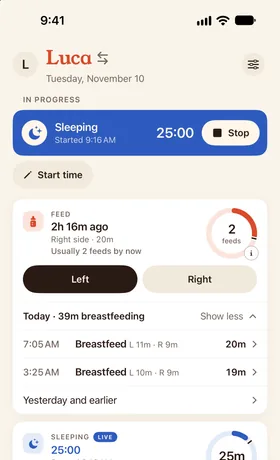
Today at a glance
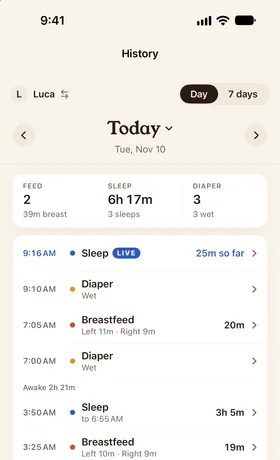
One shared timeline
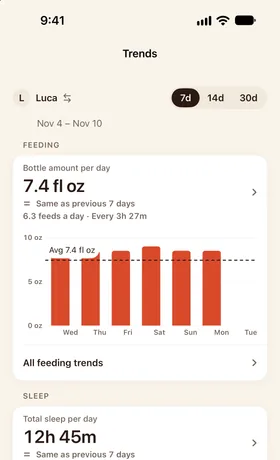
Trends for checkups
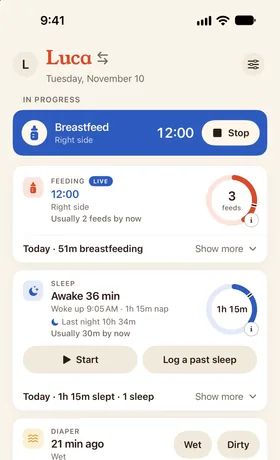
Today's naps next to a usual day
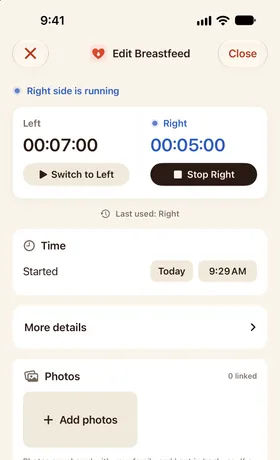
A feed in progress
The rows that decide most choices
13 rows from the full table below. Dobbin comes first because it's ours; the others are in alphabetical order.
| Feature | DobbinOurs. One purchase includes everything | Baby ConnectLogging needs a plan after any trial | Baby DaybookFree unless a cell says Paid | Baby TrackerFree unless a cell says Paid | Glow BabyFree unless a cell says Paid | HuckleberryFree unless a cell says Paid | NapperFree unless a cell says Paid | NaraLogging needs a plan after any trial | ParentLoveFree unless a cell says Paid | SproutLogging needs a plan after any trial |
|---|---|---|---|---|---|---|---|---|---|---|
| Logging without payingAfter any trial ends | No: Read-only after the trial; history stays viewable and exportable | No: Read-only after the trial | Yes: Unlimited free logging | Yes: With ads | Yes: With ads, on one account | Yes: Free core logging | Partly: Daily sleep logs and an age-based schedule | No: View and export only after the trial | Yes: Core logs, with ads | No: New entries need Premium, per a 2023 help article |
| Apple Watch + 2 caregivers, first yearCheapest documented plan that covers both, in US dollars | $29.99 once | $49.99/yr | $59.99/yr or $99.99 lifetime (Family Sync is Premium; the Watch app is free) | $4.99 once for Baby Tracker Pro, which lists the Watch app and sync; $9.98 if each caregiver buys it | About $90/yr (Family Plan) | $68.99/yr: the Watch app needs Plus; sharing is free | $69.99–129.99/yr; the Watch app's tier isn't stated | $99.99 lifetime, or $9.99/mo | Doesn't apply: No Apple Watch app | $39.99–59.99/yr |
| Apple Watch app | Yes: In the one purchase; watchOS 26 or later | Yes: watchOS 9 or later | Yes: Free | Yes: Paid: The full version, or the $4.99 Pro app | Yes: Tier not stated | Yes: Paid: Plus or Premium | Yes: watchOS 26; tier not stated | Yes | No: No Watch app listed | Yes: Logging needs Premium |
| Watch logs without the iPhone nearby | Yes: Over Wi‑Fi or cellular, with the iPhone out of range | Not documented | Not documented | Not documented | Not documented | Not documented: Needs the iPhone online; distance not stated | Not documented | Not documented | Doesn't apply: No Watch app | Not documented |
| Live Activity on a partner's phoneAppears when the other caregiver starts a timer | Yes: Appears by itself; each parent picks Alert, Quietly or Off | Not documented | Not documented | Not documented | Not documented | Partly: Paid; the partner must open the app first | Not documented | Yes: Shared sleep and feeding Live Activities | Not documented | Not documented |
| Cost of sharing | Yes: In the $29.99 purchase; no per-caregiver fee | Yes: No per-caregiver fee | Yes: Paid: One Premium covers the family | Yes: Free sync; one Plus covers the group | Yes: Paid: Family Plan, about $90/yr | Yes: Free | Partly: No extra charge per caregiver; free-tier sharing not stated | Yes: One plan per family; no per-caregiver fee | Yes: Free; ProFamily shares Pro with every caregiver | Yes: One purchase covers joined devices |
| Android phone | Yes: Android 12 or later | Yes: Logging after the trial | Yes | Yes | Yes | Yes | Yes | Yes: Logging needs a plan after the trial | Yes | Yes |
| Nap predictions | No: Shows time awake instead | Not documented | Partly: Next nap free; full-day schedule with Premium | Yes: Paid: What's Next, with Plus | Yes: Paid: Next nap and feed forecasts | Yes: Paid: SweetSpot, with Plus; from 2 months | Yes: Paid: Personalized; the free schedule is by age | Partly: Paid; you set the nap schedule | Not documented | Yes: Sleep Forecast; iPhone only |
| Feed or medicine reminders | No | Yes: Timers, reminders and alarms | Partly: Reminders; advanced repeats with Premium | Partly: Alarms and reminders; feeds and medicine not stated | Not documented | Yes: Feeds and medicine | Partly: Nap reminders; feeds and medicine not stated | Partly: Paid nap and appointment reminders | Yes: Shareable, per child | Yes: Health and feeding reminders |
| Offline logging | Yes: Saves on the phone or Watch and syncs once back online; adding a photo needs a connection | Not documented | Not documented | Not documented | Not documented | Yes: Logs offline and syncs later | Not documented | Not documented | Yes: Syncs when you reconnect | Not documented |
| Roles or permissionsFor example, a nanny who can log but not edit | No: Owner and members; everyone can log and edit | Yes: Custom access levels, per its Google Play listing | Not documented | Not documented | Not documented | Not documented | Not documented | No: Every caregiver has full access | Yes: View or log, per tracker | Not documented |
| No ads | Yes: None | Not documented | Partly: Google Play says it has ads; the developer says they were removed | No: Free version; Remove Ads, the Pro app or Plus removes them | No: Free version; Premium is ad-free | Not documented | Not documented | Yes: None in the trial or paid plans | No: Free version; upgrades remove them | Not documented |
| US App Store ratings | No ratings yet; on the App Store since October 2026 | 4.8 from 14,038 | 4.8 from 3,313 | 4.8 from 227,348 | 4.7 from 23,462 | 4.9 from 74,928 | 4.9 from 4,560 | 4.9 from 24,292 | 4.9 from 986 | 4.8 from 31,524 |
✓ yes · ◐ partly · ✗ no · ? not documented. ✓ is always the good answer: on rows like “No ads”, ✓ means none. – means it doesn't apply, for example Watch features in an app with no Watch app.
The line under each app's name says what you pay for. In apps with free logging, a cell says Paid when it needs a paid plan or purchase. Where logging itself needs a plan, the column says so once instead of Paid in every cell.
Dobbin's column comes from the app itself: its logging needs the one-time $29.99 purchase after the 14‑day free trial, which covers every caregiver and feature, and exports keep working without it. “Not documented” means the maker's public material doesn't say, not that the feature is missing. Where each fact comes from ↓
Every feature, app by app
69 rows in 7 groups. On a phone, swipe each table sideways; the feature column stays put. Open a group to see its table. Each cell has a mark, then a few words; the marks are explained under the table above.
Price and access9 rows
| Feature | DobbinOurs. One purchase includes everything | Baby ConnectLogging needs a plan after any trial | Baby DaybookFree unless a cell says Paid | Baby TrackerFree unless a cell says Paid | Glow BabyFree unless a cell says Paid | HuckleberryFree unless a cell says Paid | NapperFree unless a cell says Paid | NaraLogging needs a plan after any trial | ParentLoveFree unless a cell says Paid | SproutLogging needs a plan after any trial |
|---|---|---|---|---|---|---|---|---|---|---|
| Price (US) | 14‑day free trial, then $29.99 once for the whole household | Family $6.99/mo, $29.99 for 6 months or $49.99/yr; Professional $14.99/mo | Free tier; Premium $1.99–9.99/mo, $9.99 or $59.99/yr, or $99.99 lifetime | Free with ads; Remove Ads $4.99 once; Baby Tracker Pro, a separate app, $4.99; Plus $5.99/mo or $49.99/yr | Free logging; Premium $29.99 for 3 months or $59.99/yr; lifetime $79.99 (App Store) or $100 (website); Family Plan about $90/yr | Free core logging; Plus $11.99/mo or $68.99/yr; Premium $14.99/mo or $119.99/yr | Website: Unlimited $69.99/yr. App Store: Sleep $14.99/mo or $89.99/yr; Complete $19.99/mo or $129.99/yr | $9.99/mo or $99.99 lifetime for the family, after a 7‑day trial | Free with ads; Pro $24.99, ProFamily $39.99, single upgrades $9.99–11.99, all one-time | Premium $5.99/wk, $14.99–19.99/mo or $39.99–59.99/yr |
| One-time purchase option | Yes: $29.99 once; no subscription | Not documented: No lifetime plan advertised | Yes: $99.99 lifetime | Yes: Baby Tracker Pro is $4.99 once; Plus is a subscription | Yes: Lifetime: $79.99 on the App Store, $100 on the website | Not documented: No lifetime plan found | Not documented: No lifetime plan found | Yes: $99.99 lifetime | Yes: Every upgrade is one-time | Not documented: A lifetime option isn't clear |
| Free trial | 14 days, every feature; they start once you've logged 5 entries in a day, or 15 in total | 7 days | Not documented: Trial length not stated | 3-day preview of What's Next | 7 days on the yearly plan | 14 days of Premium | 7 days on the website's Unlimited plan | 7 days from the first log; no card needed | Optional 3-day Pro trial | Free trial; length not stated |
| Logging without payingAfter any trial ends | No: Read-only after the trial; history stays viewable and exportable | No: Read-only after the trial | Yes: Unlimited free logging | Yes: With ads | Yes: With ads, on one account | Yes: Free core logging | Partly: Daily sleep logs and an age-based schedule | No: View and export only after the trial | Yes: Core logs, with ads | No: New entries need Premium, per a 2023 help article |
| Apple Watch + 2 caregivers, first yearCheapest documented plan that covers both, in US dollars | $29.99 once | $49.99/yr | $59.99/yr or $99.99 lifetime (Family Sync is Premium; the Watch app is free) | $4.99 once for Baby Tracker Pro, which lists the Watch app and sync; $9.98 if each caregiver buys it | About $90/yr (Family Plan) | $68.99/yr: the Watch app needs Plus; sharing is free | $69.99–129.99/yr; the Watch app's tier isn't stated | $99.99 lifetime, or $9.99/mo | Doesn't apply: No Apple Watch app | $39.99–59.99/yr |
| No ads | Yes: None | Not documented | Partly: Google Play says it has ads; the developer says they were removed | No: Free version; Remove Ads, the Pro app or Plus removes them | No: Free version; Premium is ad-free | Not documented | Not documented | Yes: None in the trial or paid plans | No: Free version; upgrades remove them | Not documented |
| No ad tracking“Data Used to Track You” on the App Store privacy label | Yes: None declared | Yes: None declared | Yes: None declared | No: Identifiers | No: Purchases, location, contact info, identifiers and usage data | No: Usage data | No: Identifiers | No: Usage data | Yes: None declared | Yes: None declared |
| US App Store ratings | No ratings yet; on the App Store since October 2026 | 4.8 from 14,038 | 4.8 from 3,313 | 4.8 from 227,348 | 4.7 from 23,462 | 4.9 from 74,928 | 4.9 from 4,560 | 4.9 from 24,292 | 4.9 from 986 | 4.8 from 31,524 |
| Languages (iPhone app) | 11 languages; English plus 10 beta translations | 14 | 40 | 14 | 4 | 1 (English) | 15 | 1 (English) | 1 (English) | 11 |
Platforms8 rows
| Feature | DobbinOurs. One purchase includes everything | Baby ConnectLogging needs a plan after any trial | Baby DaybookFree unless a cell says Paid | Baby TrackerFree unless a cell says Paid | Glow BabyFree unless a cell says Paid | HuckleberryFree unless a cell says Paid | NapperFree unless a cell says Paid | NaraLogging needs a plan after any trial | ParentLoveFree unless a cell says Paid | SproutLogging needs a plan after any trial |
|---|---|---|---|---|---|---|---|---|---|---|
| iPhone | Yes: iOS 18 or later | Yes: Logging after the trial | Yes | Yes | Yes | Yes | Yes | Yes: Logging needs a plan after the trial | Yes | Yes |
| iPad | Partly: Runs as the iPhone app; no iPad layout | Yes: Native iPad app | Yes | Yes | Yes | Yes | Partly: iPhone layout on iPad | Not documented | Partly: iPhone layout on iPad | Yes |
| Android phone | Yes: Android 12 or later | Yes: Logging after the trial | Yes | Yes | Yes | Yes | Yes | Yes: Logging needs a plan after the trial | Yes | Yes |
| Apple Watch app | Yes: In the one purchase; watchOS 26 or later | Yes: watchOS 9 or later | Yes: Free | Yes: Paid: The full version, or the $4.99 Pro app | Yes: Tier not stated | Yes: Paid: Plus or Premium | Yes: watchOS 26; tier not stated | Yes | No: No Watch app listed | Yes: Logging needs Premium |
| Watch logs without the iPhone nearby | Yes: Over Wi‑Fi or cellular, with the iPhone out of range | Not documented | Not documented | Not documented | Not documented | Not documented: Needs the iPhone online; distance not stated | Not documented | Not documented | Doesn't apply: No Watch app | Not documented |
| Wear OS | No | Not documented | Yes: Free, with tiles and complications | Not documented | Not documented | Not documented | Not documented | Not documented | Not documented | Not documented |
| Web app for logging | No: The website only previews imports | Yes: Logs in a web browser | Not documented | Not documented | Not documented | Not documented | Not documented | Not documented | Not documented | Not documented |
| Mac app | No | Not documented | Partly: iPhone app on Apple silicon Macs | Not documented | Partly: iPhone app on Apple silicon Macs | Not documented | Not documented | Partly: iPhone app on Apple silicon Macs; paid | Not documented | Partly: iPhone app on Apple silicon Macs |
Logging20 rows
| Feature | DobbinOurs. One purchase includes everything | Baby ConnectLogging needs a plan after any trial | Baby DaybookFree unless a cell says Paid | Baby TrackerFree unless a cell says Paid | Glow BabyFree unless a cell says Paid | HuckleberryFree unless a cell says Paid | NapperFree unless a cell says Paid | NaraLogging needs a plan after any trial | ParentLoveFree unless a cell says Paid | SproutLogging needs a plan after any trial |
|---|---|---|---|---|---|---|---|---|---|---|
| Breastfeeding timer per side | Yes: Per-side timer; switch sides from the Lock Screen | Yes: Timed sides and side switching | Yes: Timers and side switching | Yes | Partly: Durations; side switching not stated | Yes: Per-side timer and side switching | Partly: Nursing logs; per-side timer not stated | Yes: Per-side timer and side switching | Yes: Per-side timer and side switching | Partly: Paid nursing timer; side switching not stated |
| Bottle: breast milk or formula | Yes: Breast milk, formula or mixed | Partly: Paid; breast milk vs formula not stated | Yes: Breast milk or formula | Yes | Partly: Bottles; milk type not stated | Yes | Partly: Bottle and formula logs; milk type not stated | Yes | Yes: Breast milk, formula or mixed | Partly: Paid; milk type not stated |
| Solids | Yes | Yes | Yes | Yes | Yes | Yes | Yes: Paid | Yes | Yes | Yes |
| Pumping output per side | Yes: Left and right amounts | Yes: Left and right volumes | Partly: Volume per session; per side not stated | Partly: Amounts; per side not stated | Partly: Pump log; per side not stated | Partly: Pumping timer; per side not stated | Partly: Pumping logs; per side not stated | Partly: Paid per-side timers; output per side not stated | Yes: Amounts per breast | Partly: Paid amounts; per side not stated |
| Milk stash inventory | No | Yes: Locations, bottle numbers and a forecast | Not documented | Yes: Pumped minus bottle-fed milk | Partly: Storage details; inventory not stated | Not documented | Not documented | Not documented | Yes: Paid: Milk Bank add-on or Pro | Not documented |
| Diaper color and consistency | Yes: Color, consistency and rash | Yes: Color, consistency and photos | Partly: Wet, dirty or mixed; color not stated | Partly: Wet, dirty or mixed; color not stated | Partly: Wet or dirty; color not stated | Partly: Diaper types; color not stated | Partly: Diaper logs; color not stated | Partly: Paid; wet, dirty, dry or rash; color not stated | Yes: Color, texture and amount | Partly: Paid wet or dirty; color not stated |
| Sleep timer | Yes | Yes | Yes | Yes | Not documented: Sleep logs; a timer isn't stated | Yes | Yes: Live sleep tracking | Yes | Yes | Yes |
| Sleep location | Yes: Crib, bassinet, contact, stroller or car seat | Yes: Recorded with each sleep | Not documented | Not documented | Not documented | Yes: Crib, car, stroller and more | Not documented | Not documented | Not documented | Not documented |
| Growth: weight, length, head | Yes: Weight, length and head circumference | Yes | Yes: Paid | Yes | Yes | Yes | Not documented | Yes | Yes: Paid | Yes |
| Growth percentiles (WHO or CDC) | Yes: WHO, on iPhone and Android | Yes: WHO and CDC | Yes: Paid: WHO and CDC | Yes: WHO, 0–5 years, with adjusted age | Not documented | Yes: WHO, 0–24 months | Not documented | Yes: WHO | Yes: Paid: WHO | Partly: Paid WHO and CDC charts; percentiles not stated |
| Milestones | Yes | Yes | Yes | Yes | Yes: CDC milestones | Yes | Not documented | Yes | Yes | Yes |
| Temperature | Yes | Yes | Yes | Yes | Yes | Yes | Not documented | Not documented | Yes: Paid: Health upgrade | Yes |
| Medications | Yes: Logged, not scheduled | Yes | Yes | Yes | Yes | Yes | Yes: Paid | Yes | Yes: Paid: Health upgrade | Yes |
| Symptoms and illness | Partly: A free-text symptom note | Yes | Yes | Partly: Health notes | Yes | Not documented | Not documented | Partly: Paid pregnancy symptoms; baby illness not stated | Yes: Paid: Health upgrade | Yes: Doctor-visit planner |
| Vaccines and doctor visits | Partly: Vaccines; no doctor-visit entry | Yes | Yes | Partly: Vaccines; doctor visits not stated | Not documented | Not documented | Not documented | Yes: Vaccines and appointment notes | Yes: Paid: Health upgrade | Yes |
| Bath and tummy time | Yes: As routines | Yes | Yes | Partly: As custom activities | Yes | Yes | Not documented | Yes | Partly: Tummy time free; bath with the Baby Care upgrade | Not documented |
| Custom activity types | Partly: Custom named routines | Partly: Custom labels; new categories not stated | Yes | Yes | Not documented | Partly: Custom milestones; not custom activities | Not documented | Not documented | Yes | Not documented |
| Photos on entries | Yes: On any entry | Yes | Yes: On any entry | Yes: Milestones and journal | Partly: Baby photos; on entries not stated | Yes: On milestones and solids | Not documented | Yes: On feeds and milestones | Not documented | Partly: Paid milestone and memory photos |
| Notes on entries | Yes | Yes | Yes | Yes | Yes | Yes | Not documented | Yes | Yes | Yes |
| Multiple children and twins | Yes: Everyone view; timers per child | Yes: 5 children on Family, 15 on Professional | Yes: Unlimited profiles | Yes | Yes: Unlimited | Yes | Not documented | Yes | Yes: Unlimited | Yes |
Insights and guidance7 rows
| Feature | DobbinOurs. One purchase includes everything | Baby ConnectLogging needs a plan after any trial | Baby DaybookFree unless a cell says Paid | Baby TrackerFree unless a cell says Paid | Glow BabyFree unless a cell says Paid | HuckleberryFree unless a cell says Paid | NapperFree unless a cell says Paid | NaraLogging needs a plan after any trial | ParentLoveFree unless a cell says Paid | SproutLogging needs a plan after any trial |
|---|---|---|---|---|---|---|---|---|---|---|
| Trends and charts | Yes | Partly: Reports; new logging is paid | Partly: Basic free; advanced with Premium | Yes: Daily, weekly and monthly | Partly: Summaries free; detail with Premium | Yes: Basic reports free; Enhanced Reports paid | Yes: Paid | Yes: Trend view covers 14 days | Partly: 7 days free; full history paid | Yes |
| Nap predictions | No: Shows time awake instead | Not documented | Partly: Next nap free; full-day schedule with Premium | Yes: Paid: What's Next, with Plus | Yes: Paid: Next nap and feed forecasts | Yes: Paid: SweetSpot, with Plus; from 2 months | Yes: Paid: Personalized; the free schedule is by age | Partly: Paid; you set the nap schedule | Not documented | Yes: Sleep Forecast; iPhone only |
| Wake window display | Yes: Live awake-for count | Not documented | Yes: Paid | Partly: Paid wind-down cues; awake time not stated | Not documented | Partly: With Plus or Premium; a free display isn't stated | Partly: Shown in the schedule; tier unclear | Yes: Wake-window history and next-nap countdown | Yes: Awake windows, free | Yes |
| AI assistant or summaries | No | Partly: Luma weekly AI insights; tier not stated | Not documented | Partly: Paid on-device predictions; no chat stated | Yes: Paid: GlowGPT and weekly summaries | Yes: Paid: AI logging with Plus; Berry chat with Premium | Not documented | Not documented | Not documented | Not documented |
| Sleep plans or coaching | No | Not documented | Partly: Premium adaptive schedule | Not documented | Partly: Schedules and tips | Yes: Paid: Sleep plans, with Premium | Yes: Paid: Personal schedule and a sleep course | Partly: Paid age guides and schedules | Not documented | Partly: Paid adaptive forecast; coaching not stated |
| Expert articles in the app | No | Partly: Public articles and a Food Library | Partly: Public blog | Not documented | Partly: Baby 411 articles; library with Premium | Yes: Expert articles; in-app Insights are paid | Yes: Paid: Sleep course; the blog is free | Yes: Age-based sleep and feeding guides | Partly: Guidance designed with a lactation consultant (IBCLC) | Partly: Public articles |
| White noise and sounds | No | Not documented | Not documented | Not documented | Not documented | Not documented | Yes: Paid: Custom sleep sounds | Not documented | Not documented | Not documented |
Caregivers6 rows
| Feature | DobbinOurs. One purchase includes everything | Baby ConnectLogging needs a plan after any trial | Baby DaybookFree unless a cell says Paid | Baby TrackerFree unless a cell says Paid | Glow BabyFree unless a cell says Paid | HuckleberryFree unless a cell says Paid | NapperFree unless a cell says Paid | NaraLogging needs a plan after any trial | ParentLoveFree unless a cell says Paid | SproutLogging needs a plan after any trial |
|---|---|---|---|---|---|---|---|---|---|---|
| Caregiver sharing | Yes: Every caregiver, in the one purchase | Yes: Family, nannies or daycare on one subscription | Yes: Paid: Family Sync | Yes: Sync group | Yes: Paid: Family Plan | Yes: Shared login | Yes: Share the baby and the subscription | Yes: Separate caregiver invitations | Yes: Free and unlimited | Yes |
| Cost of sharing | Yes: In the $29.99 purchase; no per-caregiver fee | Yes: No per-caregiver fee | Yes: Paid: One Premium covers the family | Yes: Free sync; one Plus covers the group | Yes: Paid: Family Plan, about $90/yr | Yes: Free | Partly: No extra charge per caregiver; free-tier sharing not stated | Yes: One plan per family; no per-caregiver fee | Yes: Free; ProFamily shares Pro with every caregiver | Yes: One purchase covers joined devices |
| Number of caregivers | Yes: No set limit | Yes: Unlimited | Not documented | Partly: No set device limit; tested with 4 | Yes: Paid: Unlimited | Not documented: More than one; no number stated | Yes: As many as you need | Yes: Unlimited | Yes: Unlimited | Not documented |
| Real-time sync | Yes: Within seconds | Yes: Advertised as instant; the FAQ also mentions a 5-minute refresh | Yes: Paid | Partly: Syncs; speed not stated | Partly: Paid server sync; speed not stated | Yes | Partly: Speed not stated | Yes: Real-time updates | Yes: Logs and running timers | Yes |
| Roles or permissionsFor example, a nanny who can log but not edit | No: Owner and members; everyone can log and edit | Yes: Custom access levels, per its Google Play listing | Not documented | Not documented | Not documented | Not documented | Not documented | No: Every caregiver has full access | Yes: View or log, per tracker | Not documented |
| Shows who logged an entry | Partly: On iPhone, when more than one person logs | Not documented | Not documented | Not documented | Not documented | Not documented | Not documented | Not documented | Not documented | Not documented |
Phone and watch integration10 rows
| Feature | DobbinOurs. One purchase includes everything | Baby ConnectLogging needs a plan after any trial | Baby DaybookFree unless a cell says Paid | Baby TrackerFree unless a cell says Paid | Glow BabyFree unless a cell says Paid | HuckleberryFree unless a cell says Paid | NapperFree unless a cell says Paid | NaraLogging needs a plan after any trial | ParentLoveFree unless a cell says Paid | SproutLogging needs a plan after any trial |
|---|---|---|---|---|---|---|---|---|---|---|
| Live Activities | Yes: Naps and breastfeeds | Not documented | Yes | Partly: Listed; tier not stated | Not documented | Yes: Paid: Plus or Premium | Not documented | Yes | Not documented | Yes |
| Live Activity on a partner's phoneAppears when the other caregiver starts a timer | Yes: Appears by itself; each parent picks Alert, Quietly or Off | Not documented | Not documented | Not documented | Not documented | Partly: Paid; the partner must open the app first | Not documented | Yes: Shared sleep and feeding Live Activities | Not documented | Not documented |
| Home Screen widgets | Yes | Partly: Widgets; tier not stated | Yes | Yes: Predictive widgets are paid | Not documented | Yes: Paid: Plus or Premium | Partly: Interactive widgets; tier not stated | Yes | Not documented | Yes |
| Lock Screen widgets | Partly: iOS 26 or later | Not documented | Yes | Yes | Not documented | No: Its help points to Live Activities instead | Not documented | Not documented | Not documented | Yes: Forecast widget |
| Log from a widget | Yes: Start or stop a nap or feed, switch sides | Not documented | Partly: Android action widgets; iPhone not stated | Not documented | Not documented | Not documented | Partly: Apple lists its interactive widgets; actions not stated | Not documented | Not documented | Yes: Start timers |
| Watch complications | Yes | Not documented | Yes: Apple Watch and Wear OS | Not documented | Not documented | Not documented | Not documented | Not documented | Doesn't apply: No Watch app | Yes |
| Siri and Shortcuts | Yes: Start and stop naps and breastfeeds; ask when the baby last ate | Yes: Siri logging; also Alexa | Yes: Siri Shortcuts | Yes: Paid: Siri Shortcuts | Not documented | Yes: Paid: Plus or Premium | Not documented | Yes: Siri and custom Shortcuts | Not documented | Yes |
| Control Center or Action button | Partly: Watch Control Center; on iPhone through Shortcuts | Not documented | Not documented | Not documented | Not documented | Not documented | Not documented | Not documented | Not documented | Not documented |
| Android widgets | Yes: Pick the child and what each widget shows | Not documented | Yes | Not documented | Not documented | Not documented | Not documented | Not documented | Not documented | Not documented |
| Android ongoing timer notification | Yes: Also for a partner's timer; Live Updates on Android 16 | Not documented | Yes: Sticky notification with controls | Not documented | Not documented | Yes: Paid: Live Updates on Android 16 | Not documented | Not documented | Not documented | Not documented |
Data and other9 rows
| Feature | DobbinOurs. One purchase includes everything | Baby ConnectLogging needs a plan after any trial | Baby DaybookFree unless a cell says Paid | Baby TrackerFree unless a cell says Paid | Glow BabyFree unless a cell says Paid | HuckleberryFree unless a cell says Paid | NapperFree unless a cell says Paid | NaraLogging needs a plan after any trial | ParentLoveFree unless a cell says Paid | SproutLogging needs a plan after any trial |
|---|---|---|---|---|---|---|---|---|---|---|
| Feed or medicine reminders | No | Yes: Timers, reminders and alarms | Partly: Reminders; advanced repeats with Premium | Partly: Alarms and reminders; feeds and medicine not stated | Not documented | Yes: Feeds and medicine | Partly: Nap reminders; feeds and medicine not stated | Partly: Paid nap and appointment reminders | Yes: Shareable, per child | Yes: Health and feeding reminders |
| Dark mode | Yes: System, light or dark | Yes | Yes | Not documented | Not documented | Yes | Not documented | Yes | Yes | Not documented |
| CSV export | Yes: Even after the trial, without buying | Partly: CSV by email; tier after the trial not stated | Partly: SQLite backup you convert to CSV yourself | Not documented: An older FAQ lists it as paid | Yes: Paid | Yes | Not documented | Yes: Even without a plan | Yes: Paid: Export upgrade or Pro; a copy from support is free | Yes: Also after cancelling |
| PDF or printable report | Yes: PDF summary, even after the trial | Partly: HTML reports; PDF not stated | Yes: Paid | Partly: PDF and print; tier unclear | Yes: Paid: A full PDF also by support request | Not documented | Not documented | Not documented | Yes: Paid: Health upgrade or Pro | Yes: Doctor reports |
| Import from other apps | Yes: Nara and Huckleberry CSVs | No: Its FAQ says there's no bulk import | Not documented | Not documented | Partly: Profile details from Glow and Nurture | No: Its help center says importing isn't supported | Not documented | Not documented | Yes: Nara CSVs, for free | Not documented |
| Backup and restore | Yes: Full backup file, restored in the app on iPhone or Android | Partly: Cloud storage; restore steps not stated | Yes: Backup and restore file | Yes: iCloud or Dropbox | Partly: Server sync; restore steps not stated | Partly: Server sync; restore steps not stated | Not documented | Partly: Saved data; restore steps not stated | Partly: Server sync; restore steps not stated | Yes: Server backup and restore |
| Offline logging | Yes: Saves on the phone or Watch and syncs once back online; adding a photo needs a connection | Not documented | Not documented | Not documented | Not documented | Yes: Logs offline and syncs later | Not documented | Not documented | Yes: Syncs when you reconnect | Not documented |
| Pregnancy or postpartum tracking | No | Not documented | Not documented | Not documented | Partly: Profile before birth; postpartum not stated | Partly: Contraction timer; postpartum not stated | Not documented | Yes: Pregnancy and postpartum | Not documented | Not documented |
| Starts without an account | No: Sign in with Apple, or Google on Android; a demo works without one | Not documented | Yes: Only for sync and sharing | Not documented | Not documented | Not documented | Not documented | Not documented | No: Its terms require one | Yes: Works without an account |
“Data Used to Track You” is the section of Apple's App Privacy label for data linked with other companies' apps and websites for advertising. Some apps list other data under “Data Linked to You”.
How we checked
Dobbin's developer wrote this page.
For the 9 other apps, we read each one's US App Store and Google Play listings, the maker's website and its help center on October 15, 2026. Every cell says what the maker documents.
Dobbin's column comes from the app itself, checked on October 30, 2026. We make Dobbin, so read its column with that in mind; its losses are in the table too.
Prices are US prices and ratings are US App Store counts. Both change often, so check the store before you buy. There are no scores or totals here: the rows don't matter equally to every family.
BabyCenter and What to Expect also have newborn loggers, but they're pregnancy and parenting-content apps first, and their public material says too little about logging to fill these rows. We mention them without scoring them: BabyCenter on the App Store or What to Expect on the App Store.
Independent reviews
Here are reviews and roundups by people who don't make these apps. We read each one on October 16, 2026. Dates are when each page was published or last updated.
- 10 Of The Best Baby Tracking Apps For Parents
- The Best Pregnancy and Baby Apps Parents Love in 2026
- Huckleberry App Review: Is the Premium Upgrade Worth It?
- If I'd had this app when my kids were young, I might've gotten a night's sleep
We found no independent review from 2024 or later for ParentLove or Sprout that met these rules, and none of Dobbin yet.
Spotted something out of date? Tell us on the support page or at support@dobbin.app, and we'll fix it.
FAQ
Questions
Answered above:
- Which baby tracker works when one parent has an iPhone and the other has Android?
- Which baby tracker works on Apple Watch when my partner uses Android?
- Which baby tracker logs from my Apple Watch when my iPhone isn't nearby?
- Which baby tracker shows WHO growth percentiles?
- Which baby tracker predicts when the next nap should start?
- Which baby tracker can I keep using for free, with no time limit?
- Which baby tracker can I pay for once, without a subscription?
- Which baby tracker lets a nanny or daycare log with limited permissions?
- Which baby tracker works for twins or more than one child?
- Which baby tracker tracks pumping and a milk stash?
- Which baby tracker lets me log without a signal?
- Which baby tracker can I switch to from Nara and keep my history?
- Which baby tracker has no ads and doesn't track me?
- Which baby tracker is available in a language other than English?
More questions
Which baby tracker apps have an Apple Watch app?
All except ParentLove list one.
- No paid plan stated: Baby Daybook, Glow Baby and Napper.
- Baby Connect: Paid plan required.
- Baby Tracker – Newborn Log: $4.99.
- Huckleberry: Plus.
- Nara: Paid plan required.
- Sprout: Premium.
- Dobbin: Included in its one $29.99 purchase after the 14‑day free trial.
How much does a baby tracker with an Apple Watch app cost for two parents?
First-year cost for an Apple Watch and two caregivers, in price order:
- Baby Tracker – Newborn Log: $4.99 once for Baby Tracker Pro, which lists the Watch app and sync; $9.98 if each caregiver buys it.
- Dobbin: $29.99 once.
- Sprout: $39.99–59.99/yr.
- Baby Connect: $49.99/yr.
- Baby Daybook: $59.99/yr or $99.99 lifetime (Family Sync is Premium; the Watch app is free).
- Huckleberry: $68.99/yr; the Watch app needs Plus; sharing is free.
- Napper: $69.99–129.99/yr; the Watch app's tier isn't stated.
- Glow Baby: About $90/yr (Family Plan).
- Nara: $99.99 lifetime, or $9.99/mo.
- ParentLove: No Apple Watch app.
Prices are US App Store prices and change often.
Which baby trackers let two parents share without paying?
Free sharing and its limits:
- Free: Baby Tracker – Newborn Log, Huckleberry and ParentLove.
- Baby Connect: Paid. No per-caregiver fee.
- Baby Daybook: Paid. One Premium covers the family.
- Glow Baby: Paid. Family Plan, about $90/yr.
- Nara: Paid. One plan per family; no per-caregiver fee.
- Sprout: Paid. One purchase covers joined devices.
- Napper: No extra charge per caregiver; free-tier sharing not stated.
- Dobbin: Every caregiver is included in its one $29.99 purchase, with no per-caregiver fee.
Which baby tracker shows my partner's timer on my Lock Screen?
Dobbin and Nara document a Live Activity appearing on the other caregiver's iPhone when a timer starts.
- Huckleberry: Paid; the partner must open the app first.
- Other apps: Their public material doesn't say.
- Dobbin controls: Each parent picks Alert, Quietly or Off for naps and breastfeeds.
Can I bring my history from another baby tracker app?
Dobbin imports Nara and Huckleberry CSV exports. No other app in this comparison documents importing from both.
- ParentLove: Imports Nara CSVs, for free.
- Glow Baby: Brings over profile details from Glow and Nurture.
- No import: Baby Connect and Huckleberry.
- Other apps: Their public material doesn't say.
How does Dobbin compare on features overall?
Dobbin focuses on shared logging. Baby Daybook, Huckleberry, Baby Tracker – Newborn Log and Baby Connect match or beat it on breadth.
- Missing: Dobbin doesn't predict naps, set feed or medicine reminders, keep a milk stash inventory, give caregivers different permissions or run on Wear OS.
- Other limits: Logging isn't free after its 14‑day trial, and it has no App Store ratings yet.
- Fits: Two or more people logging on iPhone or Android, often from an Apple Watch, for $29.99 once.
Sources
Each app's cells come from these pages, most-used first. We read each one on October 15, 2026. Spotted something out of date? Tell us and we'll fix it.
Baby Connect14 sources
- US App Store listing and subscription terms
- Integrations: web, Watch, Siri
- Support FAQ
- US Google Play listing
- Sleep fields and dark mode
- Voice commands: nursing, bottles, pumping
- Medical fields
- Activities, photos and notes
- Feeding and milk stash
- Reports and exports
- App Store version history: widgets
- Apple US lookup: ratings and languages
- Luma AI and Food Library announcement
- Diaper fields
Baby Daybook14 sources
- Premium features and shared plan
- US App Store listing
- Free versus Premium sleep features
- Apple widgets, Live Activities and Watch
- US Google Play listing
- Product homepage
- Feeding tracker
- Android widgets, notifications and Wear OS
- Sleep predictions
- Growth, teething and photos
- Terms of service: accounts and trial
- SQLite backup and converting it to CSV
- Apple US lookup: ratings and languages
- Developer reply about ads (Croatian App Store)
Baby Tracker – Newborn Log8 sources
Glow Baby13 sources
- US App Store listing
- Features, prices and Family Plan FAQ
- US Google Play listing
- Help: Family Plan needed for a second caregiver
- Help: logging, notes, photos, Baby 411
- Help: Premium, GlowGPT and caregivers
- Help: syncing with a partner
- Help: bringing Glow or Nurture data across
- Apple US lookup: ratings and languages
- Help: growth measurements
- Help: comparison charts stop at 12 months
- Help: full PDF by request
- Help: before the baby arrives
Huckleberry28 sources
- Pricing
- US App Store listing
- Huckleberry Free
- Milestones, growth and photos
- Help: what else you can track
- US Google Play listing
- Help: iOS widgets
- Help: Apple Watch and membership
- Help: Siri commands
- Help: basic and Enhanced Reports
- Help: export, and no import
- Help: Premium free trial
- Help: Live Activities and Android Live Updates
- Help: Siri
- Help: using the app offline
- Apple US lookup: ratings
- Help: Apple Watch while offline
- Help: sleep details
- Help: growth chart percentiles
- Help: adding your own activity
- Expert articles
- Help: Live Activities on another device
- Setting up reminders
- Help: dark mode
- Is there a minimum device or OS requirement to use Huckleberry for Apple Watch?
- How do I install Huckleberry on my Apple Watch?
- How do the Apple Watch timers work?
- Will I get Live Activities on my Apple Watch?
Napper8 sources
Nara Baby & Pregnancy Tracker5 sources
ParentLove11 sources
Get Dobbin for iPhone, Apple Watch and Android.
14‑day free trial, then $29.99 once for the whole household. Set up your household, invite your partner, and start the next feed from your phone or your wrist.