Dobbin vs Huckleberry
A Huckleberry alternative built for Apple Watch.
Huckleberry has free logging, with SweetSpot nap predictions and sleep plans in paid tiers. Dobbin has a 14‑day free trial, then $29.99 once for the whole household. When your partner starts a nap or breastfeed, it shows on your Lock Screen, and the Apple Watch app logs with your phone in another room.

| Feature | Dobbin | Huckleberry |
|---|---|---|
| Log without paying | 14‑day trial | ✓ |
| Apple Watch app | $29.99 once | Plus |
| Nap predictions | ✕ | Plus |
| Offline logging | Paid | ✓ |
| No tracking | ✓ | ✕ |
| Android | Paid | ✓ |
Inside Dobbin
See Dobbin before you decide.
Real screens from the iPhone app, filled in with a demo day for twins Luca and Maia.
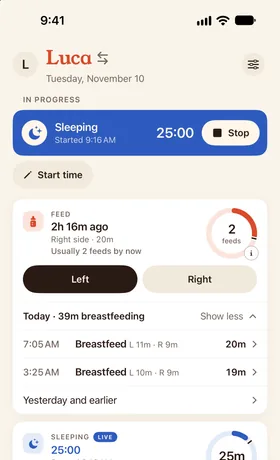
Today at a glance
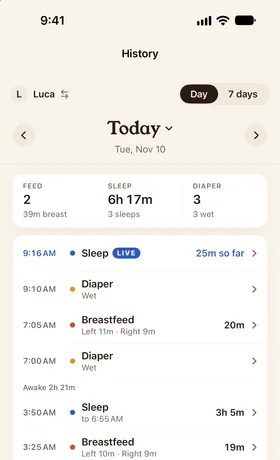
One shared timeline
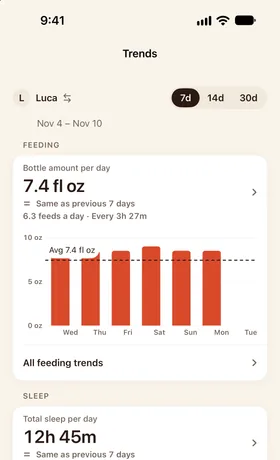
Trends for checkups
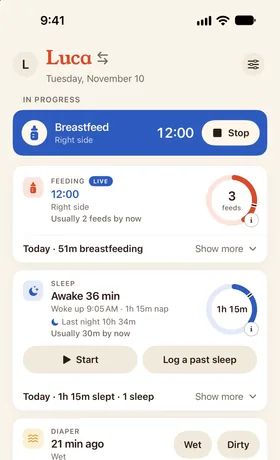
Today's naps next to a usual day
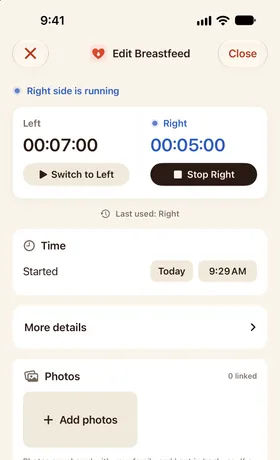
A feed in progress
Dobbin and Huckleberry, side by side
Checked October 15, 2026. Prices are US App Store prices. Tracking details for Huckleberry come from its App Store privacy label.
| Feature | DobbinOurs. One purchase includes everything | HuckleberryFree unless a cell says Paid |
|---|---|---|
| Price (US) | 14‑day free trial, then $29.99 once for the whole household | Free core logging; Plus $11.99/mo or $68.99/yr; Premium $14.99/mo or $119.99/yr |
| Logging without payingAfter any trial ends | No: Read-only after the trial; history stays viewable and exportable | Yes: Free core logging |
| Apple Watch + 2 caregivers, first yearCheapest documented plan that covers both, in US dollars | $29.99 once | $68.99/yr: the Watch app needs Plus; sharing is free |
| Apple Watch app | Yes: In the one purchase; watchOS 26 or later | Yes: Paid: Plus or Premium |
| Watch logs without the iPhone nearby | Yes: Over Wi‑Fi or cellular, with the iPhone out of range | Not documented: Needs the iPhone online; distance not stated |
| Live Activity on a partner's phoneAppears when the other caregiver starts a timer | Yes: Appears by itself; each parent picks Alert, Quietly or Off | Partly: Paid; the partner must open the app first |
| Cost of sharing | Yes: In the $29.99 purchase; no per-caregiver fee | Yes: Free |
| Nap predictions | No: Shows time awake instead | Yes: Paid: SweetSpot, with Plus; from 2 months |
| Sleep plans or coaching | No | Yes: Paid: Sleep plans, with Premium |
| AI features | No | Yes: Paid: AI logging with Plus; Berry chat with Premium |
| Offline logging | Yes: Saves on the phone or Watch and syncs once back online; adding a photo needs a connection | Yes: Logs offline and syncs later |
| Import from other apps | Yes: Nara and Huckleberry CSVs | No: Its help center says importing isn't supported |
| No ads | Yes: None | Not documented |
| No ad tracking“Data Used to Track You” on the App Store privacy label | Yes: None declared | No: Usage data |
| Android phone | Yes: Android 12 or later | Yes |
✓ yes · ◐ partly · ✗ no · ? not documented. “Not documented” means the maker's public material doesn't say, not that the feature is missing. Where each fact comes from ↓ See all ten apps compared →
Which one fits your family?
Huckleberry does some things Dobbin doesn't. Here's when each one is the better pick.
Stay with Huckleberry if…
- You want the app to suggest when the next nap should start.
- You'd like a personalised sleep plan or an AI assistant to ask questions.
- You want logging and sharing without paying anything.
Switch to Dobbin if…
- You want to log from your Apple Watch without a subscription; Huckleberry's Watch app needs Plus or Premium.
- Two or more caregivers log, and you want each other's timers on your Lock Screen and watch face within seconds, without opening the app.
- You'd rather pay once for everything than choose a tier, with no ads or ad tracking.
Switching guide
How to switch from Huckleberry
Export your Huckleberry history
- Tap your child's profile icon in Huckleberry's menu bar.
- Scroll down and choose Export tracking data as CSV, then Got it! Email it.
- Open Huckleberry's email and download the CSV to Files or Downloads.
- Repeat for each child. The emailed download link works for 24 hours; request a new one if it expires.
Do you need a paid plan to export? Huckleberry's help article describes CSV export without mentioning a paid plan.
From Huckleberry's help article on exporting, checked October 16, 2026.
What moves from Huckleberry
What comes over
- Breastfeeding, bottles and solids
- Sleep and diapers
- Pumping and growth measurements
- Medicine, temperature, vaccines and other health entries
- Tummy time, bath, bedtime and other routines
- Milestones, and every entry's notes and original exported details
What doesn't
- Photos. Dobbin imports the CSV's entries, not pictures.
- Your child's name and the time zone you logged in: the CSV has neither, so you choose the child and the time zone when you import.
- SweetSpot predictions, sleep plans and reports. They're Huckleberry features, not part of your log.
- Any entry type Dobbin doesn't recognise. The preview lists it, and you leave it out before you finish.
- Your caregivers and your old app's subscription. Invite everyone to your Dobbin household again.
Bring it into Dobbin
Drop the CSVs on the import page for a private preview of each child's history, then tap Finish in Dobbin on your phone. Nothing is added to your household until you finish in the app, and you keep your original files.
Imported entries join your timeline in Dobbin's History tab.
FAQ
Dobbin vs Huckleberry questions
Is Dobbin a good Huckleberry alternative?
If you mostly want fast logging from your Apple Watch and one shared timeline that keeps every caregiver's Lock Screen current, for one $29.99 payment, yes. If you want nap predictions, a sleep plan or free logging, Huckleberry is the stronger fit.
Is Dobbin free like Huckleberry?
No. Dobbin has a 14‑day free trial, then $29.99 once for the whole household, with every feature included and no subscription. Huckleberry's free tier includes tracking and caregiver sharing, and its nap predictions, sleep plans and Apple Watch app are paid.
Does Huckleberry's Apple Watch app cost extra?
Yes. Huckleberry's help center says its Apple Watch app needs Plus or Premium; as of October 2026, Plus is $11.99 a month or $68.99 a year. Dobbin's Watch app is part of its one $29.99 purchase.
Does Dobbin predict naps like Huckleberry's SweetSpot?
No. Dobbin shows how long your baby has been awake, and this site has a chart of typical wake windows by age, but the app doesn't predict nap times.
Is Huckleberry free?
Yes, for logging and sharing through one shared login. Nap predictions and the Watch app need Plus; sleep plans and Berry need Premium.
- Price: Free core logging.
- Plus: $11.99/mo or $68.99/yr.
- Premium: $14.99/mo or $119.99/yr.
Can I move my Huckleberry data to Dobbin?
Yes. Ask Huckleberry to email a CSV export for each child, then drop the files at dobbin.app/import/huckleberry for a private preview and tap Finish in Dobbin, or upload them in the app (Account → Import history). Check the time zone the entries were logged in first. Keep your original CSVs.
Is Dobbin on Android like Huckleberry?
Yes. Dobbin for Android is on Google Play and needs Android 12 or later. An iPhone and an Android phone share one household, and the one $29.99 purchase, made on either, unlocks everyone. There's no Wear OS app.
Sources
Each app's cells come from these pages, most-used first. We read each one on October 15, 2026. Spotted something out of date? Tell us and we'll fix it.
Keep exploring
Get Dobbin for iPhone, Apple Watch and Android.
14‑day free trial, then $29.99 once for the whole household. Set up your household, invite your partner, and start the next feed from your phone or your wrist.