Breastfeeding & feeding tracker
A breastfeeding tracker that remembers which side is next.
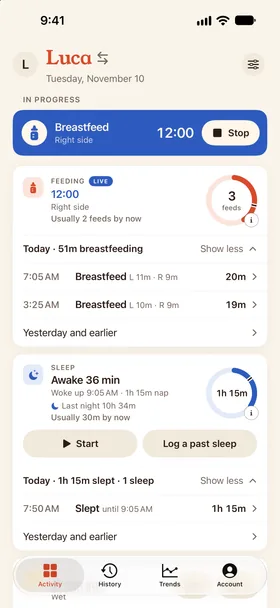
Time each side, switch with one tap, and log bottles and solids in seconds. Every feed lands in one shared log, so whoever does the next one knows exactly when the last one ended. A running breastfeed shows on every caregiver's phone, side and all: as a Live Activity on iPhone and an ongoing notification on Android.


- Left and right timers
- On every caregiver's phone
- Bottle amounts in ml or oz
- Solids
How it works
Feeding, logged at the speed of feeding.
Start on the right side
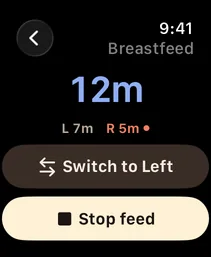
Dobbin suggests the side to start on, based on where the last feed ended. Tap once on your phone or your Apple Watch, ask Siri on iPhone, or use the Quick Settings tile on Android.
Switch without stopping
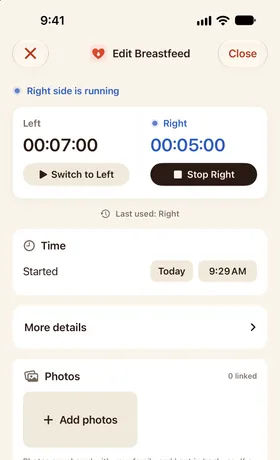
Change sides mid‑feed and the timer keeps running. Dobbin records each side's time separately.
See the pattern
History shows every feed on a timeline, and Trends adds up feeds and amounts over the week.
Every kind of feed, in one feeding log.
Breast, bottle, solids, or a mix of all three in one sitting.
Breastfeeding
Per‑side timers, side switching and a running total, with the next side suggested when you start.
Bottles
Amount in milliliters or fluid ounces, with breast milk, formula or mixed as the source.
Solids
A quick note of what they tried, for the first spoonfuls and every food after.
Combination feeds
Breast then top-up bottle? Log it as one feed so your counts stay honest.
Time since last feed
On the Activity screen, your home screen widget and your watch face, counting from when the last feed started.
Fix it later
Forgot to stop the timer? Edit the start or end time afterwards. Your partner sees the correction too.
Shared feeds, from start to finish.
The handoffs that usually end in “which side was it?”
What you tap
Switch sides with one tap.
A running feed keeps each side's time and remembers which side you used last.
Your partner can check the feed quietly
Start a breastfeed on your phone or Apple Watch. It appears quietly on your partner's lock screen by default, as a Live Activity on iPhone or an ongoing notification on Android, with the side and running time.
Switch sides from the Lock Screen
On iPhone, a running breastfeed's Live Activity has Switch and Stop buttons, on your phone and your partner's, so you change sides without unlocking. On Android, the ongoing notification has the same buttons.
Started on one phone, stopped on another
Your partner starts the feed and hands the baby over: you stop it on your phone. You both see and control the same household timer.
The pediatrician wants to see feeds
Export a PDF summary or a CSV of every feed, even after the trial and without buying.
What's worth tracking when you breastfeed
In the newborn weeks, the questions are simple and constant: when did the last feed start, how long did it go, and which side was it on? A breastfeeding tracker keeps those answers for everyone who helps.
Dobbin records the facts and leaves the judgement to you and your pediatrician. If something about feeding worries you, a lactation consultant or your baby's doctor is the right call. A feeding log simply makes that conversation easier.
- When each feed started and how long it lasted
- Time on the left and right side
- Bottle amounts and whether it was breast milk or formula
- Notes and photos for anything you want to remember
FAQ
Feeding questions
How does Dobbin know which side to start on?
It looks at the side the previous breastfeed ended on and suggests the other one. You can always pick the side yourself.
Can I track both breastfeeding and bottles?
Yes. Breastfeeds, bottles of breast milk or formula, solids, and combination feeds all live in the same feeding log, from the first newborn feeds on. Diapers, sleep and pumping go in the same shared log.
Can I export my feeding log for a doctor's visit?
Yes. Export a PDF or CSV of your history at any time, or a full backup of everything.
Does Dobbin tell me how much my baby should eat?
No. Dobbin records what you observe and doesn't give medical advice. Ask your pediatrician about feeding amounts and frequency.
Keep exploring
Get Dobbin for iPhone, Apple Watch and Android.
14‑day free trial, then $29.99 once for the whole household. Set up your household, invite your partner, and start the next feed from your phone or your wrist.