Baby tracker for twins
Two babies, one screen, one tap for both.
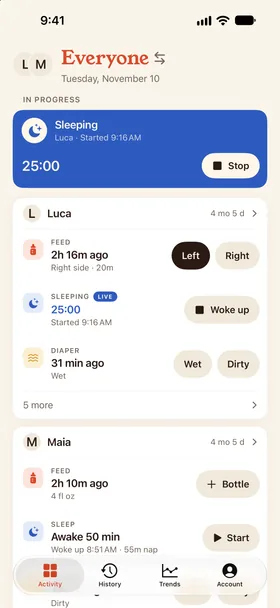
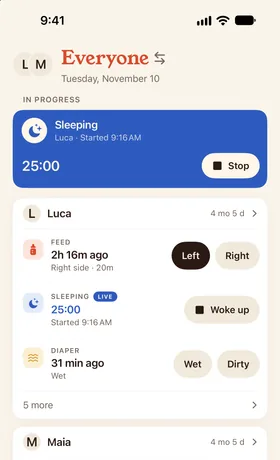
Everyone shows both babies side by side with their last feed, nap and diaper. Feed both starts two breastfeeds on opposite sides, Sleep both starts both naps, and every caregiver sees the timers as they run.


- Everyone view
- Feed both
- Sleep both
- No charge per child
How it works
Feeding twins at the same time, in one tap.
Add both babies
Add each baby to the same household. One purchase covers every child and every caregiver.
Choose Everyone
Long-press the baby's name and choose Everyone. Each baby gets a short card with their chosen activities, and buttons that act on that baby only.
Start both at once
Tap Feed both to start a breastfeed for each baby on opposite sides, or Sleep both to start both naps. Stop each one when that baby's done. Undo takes back both.
Built for two babies on one schedule.
Or a toddler and a newborn on two different ones.
Everyone view
Every child on one screen, always in the same order, so a tired tap lands on the right baby.
Feed both
Starts a breastfeed for each baby. If both would start on the same side, the second baby takes the other one.
Sleep both
Starts both naps at once. Each nap stops on its own, because babies rarely wake together.
Timers per baby
Each baby has their own timers, so one can nap while the other feeds.
History for each baby
History and Trends stay per baby, so each one's feeds and sleep are ready for checkups.
Both on your Home Screen
The Status widget can show every child, so both babies' last feed is a glance away.
Twins and siblings.
Both babies on one screen.
Everyone view
Two babies, one screen, one tap for both.
Both babies on one screen.
Both awake at 3am
Tap Feed both. Each baby gets their own breastfeed on opposite sides, and either of you can stop one when that baby's done.
One naps, one doesn't
Each baby's nap runs on its own timer, so a 40-minute nap and a 15-minute one are both logged as they happened.
A toddler and a newborn
Each child's card shows their own activities. Tap a card's name to open that child's full day.
Tracking twins without two of everything
With twins, the hard question isn't when the baby last ate. It's which baby, and which side. Switching between two profiles at 3am is how a feed ends up on the wrong baby.
Everyone keeps both babies in view and puts each baby's buttons on that baby's own card. Feeding twins at the same time takes one tap, and the log still records two separate feeds, so each baby's history stays accurate.
Dobbin doesn't set feeding schedules or targets for twins. It keeps an accurate log of both babies that you can share with your partner and export for your pediatrician.
FAQ
Twins questions
Is there a baby tracker app for twins?
Yes. Dobbin tracks every child in one household. Everyone shows them on one screen, and Feed both and Sleep both start both babies at once.
How do I track feeding twins at the same time?
Choose Everyone, then tap Feed both. Dobbin starts a breastfeed for each baby on opposite sides and times them separately, so you can stop each baby's feed when they finish. For bottles, open each baby's full day and log a bottle.
Can Dobbin make a twins feeding schedule?
Dobbin doesn't create schedules. It shows how long it's been since each baby's last feed and, in Trends, how often each baby usually feeds, so you can see whether their rhythms are lining up.
Do I pay extra for a second baby?
No. One purchase covers every child and every caregiver in the household.
Does it work for a toddler and a newborn?
Yes. Each child's card shows that child's own activities in the order you choose. Tap a child's name to open their full day.
Can my partner see both babies?
Yes. Everyone in the household sees both babies' entries and running timers as they happen. The Everyone view is on iPhone and Android.
Keep exploring
Get Dobbin for iPhone, Apple Watch and Android.
14‑day free trial, then $29.99 once for the whole household. Set up your household, invite your partner, and start the next feed from your phone or your wrist.